STEALTH RUST
system requirements
Supported OC: Windows 10, 11 (x64) 21H1, 21H2, 22H2, 21H2, 22H2, 23H2, 24H2
Supported CPU: Intel and AMD with AVX
Supported game modes: All
Stream Bypass: No
Anticheat: EAC
Included spoofer: No
Supported client: STEAM
Additional requirements: UEFI bios , enable virtualization , disable secure boot

More products for this game
UNNAMEDin stock

UNNAMED

$6.00

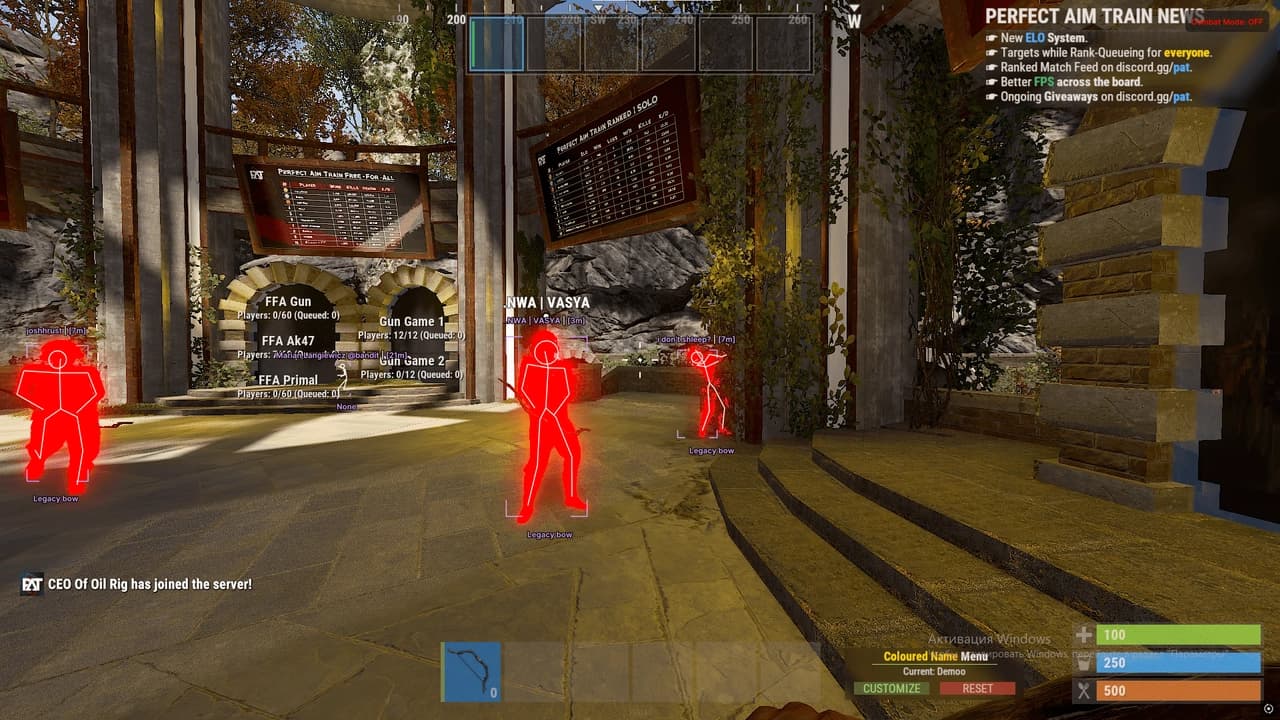
Unnamed is a private cheat for Rust, built for stability, low detection risk and full customization. It includes two powerful aiming systems — Silent Aim and Vector Aimbot — each offering bone selection, FOV control, smoothness, movement prediction, distance limits and filters for sleepers and bots. The ESP system covers players, bots and world objects. Player ESP includes chams, boxes, skeletons, nicknames, distance, held item display, inventory ESP and team/sleeper filtering. Bot ESP provides identical options for full awareness in PvE-heavy areas. The World ESP module highlights all important Rust objects: workbenches, cupboards, large/small boxes, sleeping bags, trees, metal, sulfur, stone nodes, hemp, food, barrels, crates, dropped items, corpses and animals. The Misc tab offers recoil removal, sway/stability adjustments, spread control, a toggle for World ESP via hotkey, ESP font scaling and full configuration management (create, save, load, delete). AIMBOT Silent Aim Enable Silent Aim Bone: Head / Neck / Body Aim Key FOV Max Distance Ignore Sleepers Ignore Bots Draw Line to Target Show FOV Circle Show Aim Target Line Vector Aimbot Enable Aimbot Bone: Head / Neck / Body FOV Smoothness Target Prediction Aim Key Max Distance Ignore Sleepers Ignore Bots Draw Line to Target Show FOV Circle Show Aimbot Target Line Players / Bots ESP Enable ESP Chams (Players / Bots) Boxes Skeletons Show Held Item Show HotBar (Inventory) Nickname Distance Hide Teammates Show Sleepers Max Distance Separate settings for bots World ESP Workbench (with level) Tool Cupboard Large Box Small Box Sleeping Bag Wood / Metal / Sulfur / Stone Hemp Food Barrels Crates Dropped Items Corpses Animals Misc No Recoil (0–100%) No Weapon Sway No Spread Combat Mode Hotkey (turn on/off World ESP) ESP Font Size Enable Crosshair Create / Save / Load / Delete Config

ANCIENT RUSTin stock

ANCIENT RUST

$5.00

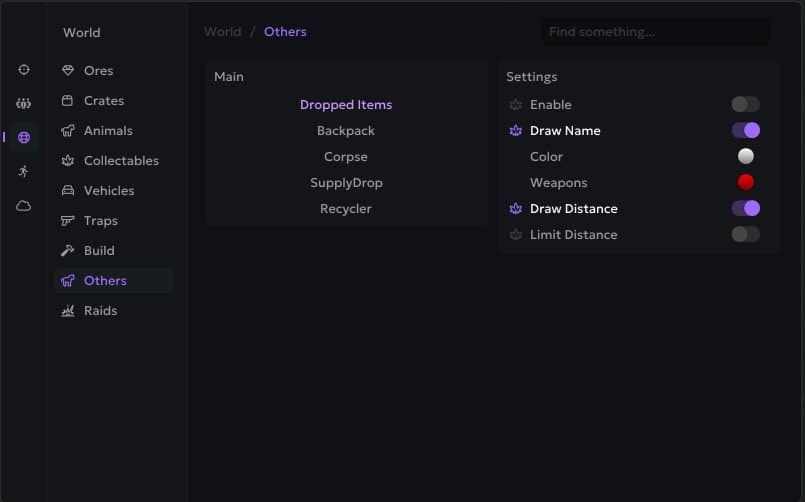
Private ANCIENT RUST software for Rust. Stable operation, low detection rate, instant key delivery after payment. ANCIENT for RUST offers advanced aimbot and ESP, allowing you to easily detect enemies and critical objects, giving you a survival edge. Features: Aimbot: • Enable — enable aimbot • Aim Key — set custom aim key • Aim Type (Memory / Silent) — select aimbot mode (memory-based or silent) • Smooth — aim smoothing • Delay — delay before aiming • Hit Chance — chance to hit • Draw Fov — show FOV circle • Fov Radius — set FOV radius • Draw Crosshair — show custom crosshair • Prediction Dot — show prediction dot • Target Line — draw line to target • Target Lock Key — set target lock hotkey • Lock Target — lock on current target • Max Aim Distance — maximum aim distance • Target Vischeck (Performance) — enable visibility check (may impact performance) • Force Head On Npc — force head aim on NPCs • Target Settings (Enemies/Npcs/Teammates/Sleepers/Friends) — target filters • Randomize Bone — enable randomized bone aiming • Target Bones (Head/Chest/Arms/Spine/Body) — bone selection for targeting Weapon: • Recoil — remove recoil • Recoil X — recoil compensation X-axis • Recoil Y — recoil compensation Y-axis • Spread — remove bullet spread • Spread Value — customize spread value • No Shotgun Spread — disable shotgun pellet spread • Instant Eoka — instant fire for Eoka • Instant Bow — instant fire for bow • Instant Compound — instant fire for compound bow • Force Automatic — convert weapons to full auto • Increase Bullet Speed — increase projectile speed • No Bob — disable weapon bobbing • No Lower — prevent weapon lowering • No Animations — remove weapon animations • No Sway — disable sway • Extended Melee — increase melee hit range Rage: • Auto Shoot — auto fire when target is valid • Rapid Shoot — increase fire rate • Thick Bullet — extend hitbox width • Bullet Thickness — bullet thickness setting • Hit Override (Only Head/No Head) — force hit only head / exclude head • Heli Rotor Override — override rotor hit detection • Hit Material Glass — bullets penetrate glass Players (Enemy/Team/Npc/Sleeper): • Enable — enable player ESP • Box — draw box around player • Box Type — set box style • Weapon — show equipped weapon • TeamID — display team ID • Distance — show distance to player • Skeleton — draw player skeleton • Look Direction — show view direction • Friendship — mark as friend • Look Alert — alert when player looks at you • Flags — status flags • Hotbar (Above players) — show hotbar above players • Explosion Flags — explosion-related markers • Visible Check (Performance) — visibility check (may reduce performance) • Offscreen Arrows — enable offscreen indicators • Arrows Radius — set offscreen arrow radius • Draw Hotbar — show player hotbar • Hotbar Scale — scale hotbar size • Draw Dead Players — display dead bodies • Player Chams — enable player chams • Chams Type — select chams type Radar: • Enable — enable radar • Radar Scale — adjust radar scale • Max Show Distance — max range for showing entities • Draw Enemies — show enemies on radar • Teammates — show teammates on radar • Npcs — show NPCs on radar • Sleepers — show sleepers on radar World: • Ores — show ore nodes • Crates — show crates • Animals — show animals • Collectables — show collectable items • Vehicles — show vehicles • Traps — show traps • Build — show base structures • Others — show other world objects • You can fully customize every selected object — full customization per object • Draw Name — display object name • Draw Distance — display object distance • Limit Distance — enable draw limit • Max Distance — set max ESP range Draw Closest X Bonus — highlight closest X objects: • Farm Assist — enable ore farming assist • Path Finding — draw optimal route to nearest ores (Stone/Metal/Sulfur) Raids: • Enable — enable raid detection • Raid Time — time since explosion • Max Raid Time — max time to consider as raid • Max Raid Distance — max distance for raid ESP • Draw C4 — show C4 • Draw Satchel — show satchels • Draw Rocket — show rockets • Draw Explosive Ammo — show explosive rounds • Draw Mlrs — show MLRS strikes Misc (General): • Weapon Chams — enable chams on weapons • Hand Chams — enable chams on hands • Instant Loot — loot instantly • Instant Revive & PickUp — revive and pick up instantly • Debug Camera — enable debug camera • Debug Speed Multiplyer — debug cam speed multiplier • Battle Mode — enable battle mode • Friend Ship Enable — enable friendship system • Mark As Friend — mark target as friend • Mark As Enemy — mark target as enemy • FishingBot — enable fishing bot • Auto Fishing Bot — automatic fishing • Auto Swap Fishing Rod — auto-switch fishing rod Misc (World): • Player Fov — player FOV control • Fov Value — FOV value • Player Zoom — player zoom control • Zoom Value — zoom value • No Screen Shake — disable screen shake • No Shadows — remove shadows • Aspect Ratio — override aspect ratio • Aspect Value — set aspect ratio value • Bright Night/Caves — brighten night and caves • Bright Intensivity — control brightness level • Sky Color — change sky color • Rayleigh — atmosphere density • Rayleigh Value — Rayleigh setting • Mie — fog intensity • Mie Value — Mie setting • Remove Layers — remove terrain layers Movement: • No Fall Damage — disable fall damage • Spider — walk on walls • Infinity Jump — unlimited jumps • Shoot In Air — shoot while airborne • No Player Collision — disable player collisions • Omni Sprint — sprint in all directions • No Clip — enable noclip • No Clip Reset — reset noclip • No Clip Speed Multiplyer — set noclip speed multiplier • On Ladder — interact while on ladder • Anti SpeedHack Violations — prevent speedhack flags • SpeedHack — increase movement speed Other: • Limit Render FPS — cap ESP rendering FPS • Skeleton Thickness — set skeleton line thickness Cloud Configs: • Create — create new config • Save — save current config • Import — import config • Export — export config

MORPHINE RUSTin stock

MORPHINE RUST

$5.00

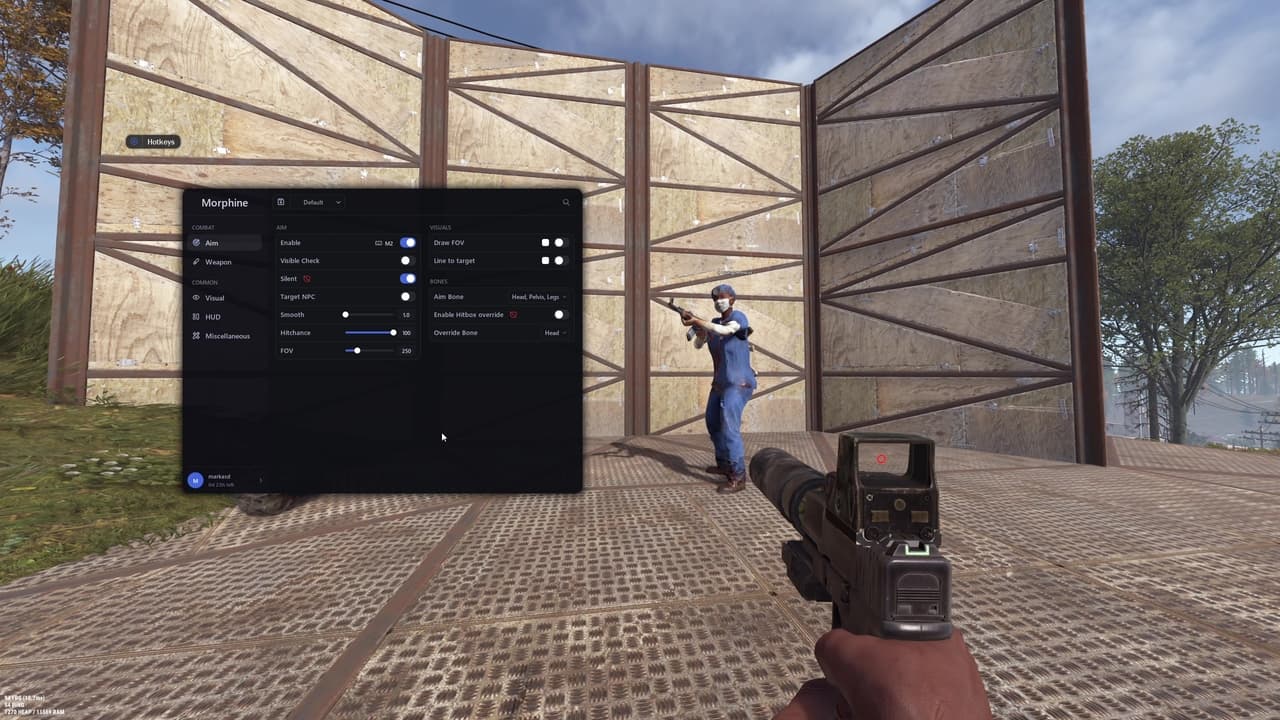
Private MORPHINE RUST software for Rust. Stable operation, low detection rate, instant key delivery after payment. Morphine for Rust with Aimbot, ESP, Radar and Loot features. Features: Aim: • Enable • Visible Check • Silent • Target NPC • Smooth • Hitchance • FOV • Draw FOV • Line to Target • Aim Bone • Hitbox Override • Override Bone Weapon: • Recoil Compensation • No Recoil • No Spread • Shotgun No Spread • Fast Bullet • Rapid Fire • Fat Bullet • Always Shoot • Instant Eoka • Instant Bow • Instant Compound Player ESP: • Enable • Visible Check • Distance • Sleepers • Wounded • Draw Indicators • Draw on Map • Draw on Radar • Player Chams • Boxes • Skeleton • Health Bar • Nickname • Distance Tag • Team ID • Flags • Held Item • Item Icon World ESP: • Sleeping Bag • Cupboards • Workbenches • Gun Trap • Turret • Sam Site • Flame Turret • Land Mine • Corpses • Backpacks • Dropped Items Vehicles: • Mini Copter • Scrap Heli • Bicycle • Motor Bike • Horse • Boat Resources: • Sulfur • Metal • Stone • Hemp • Crates Events: • Raid ESP • Animals • Bradley • Chinook • Patrol Heli HUD: • Copy Steam Link • Clothes • Hotbar • Hitmarkers • Rocket Helper • Local Bullet Tracer • World Bullet Tracer • Radar Bullets • Reload Bar • Raycasting • Hand Chams • Gun Chams • Bind Island • Watermark • FPS Counter • Server Info • Radar Movement: • Infinity Jump • Spider • Always Sprint Loot: • Fast Loot • Instant Revive • Loot Tied Crates • Silent Melee • Silent Farm • Drop All Items Weapon Visual: • No Weapon Bob • No Weapon Lower • No Weapon Animation Misc: • Battle Mode • Change Hand Position • Remove Layers • Debug Camera • Third Person • Zoom • FOV Changer • Aspect Ratio World Visual: • Bright Ambient • Fog Color • Sky Color • Change Clouds • Change Stars • Change Time • Change Atmosphere • Change Weather

COVCHEG RUSTin stock

COVCHEG RUST

$4.35

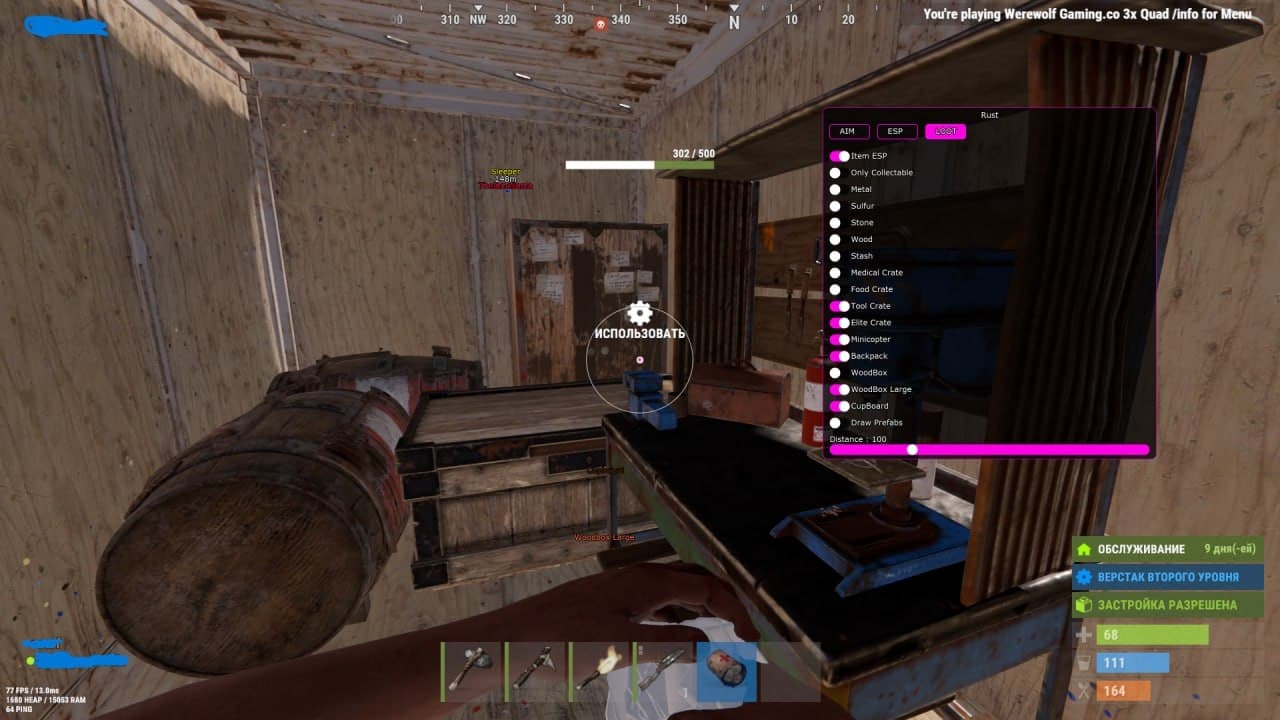
Private COVCHEG RUST software for Rust. Stable operation, low detection rate, instant key delivery after payment. Elevate your gameplay in RUST with the budget-friendly COVCHEG private cheat by developer COVCHEG. Unlock features like ESP, aimbot. Features: AIM (AIMBOT): • Active – enable the aimbot • FOV – size of the aimbot's targeting area • Draw FOV – display the aimbot FOV circle on screen • Smooth – aiming smoothness (higher value = weaker aim assist) • Aim Distance – effective range of the aimbot • Bone Body / Force Head – by default, the aimbot targets the body; enable Force Head to target the head • Remove Sway & Recoil – disables weapon sway and recoil when shooting • Aim Key – key to activate the aimbot (hold to use) Player ESP (Wallhack): • Enable – enable/disable wallhack to display players in Rust Covcheg • BOX – wallhack with player boxes • Names – show player nicknames • Skeleton – skeleton-based wallhack • Distance – display distance to targets (in meters) • Max Distance – limit the range of the player ESP • Ignore Sleepers – don't show sleeping players Loot / World ESP: • Item ESP – enable ESP for item display • Only Collectable – show only lootable items • Ores (Metal, Sulfur, Stone) – display ore nodes (metal, sulfur, stone) • Wood – show wood piles • Stash – show hidden stashes • Crates (Medical, Food, Tool, Elite) – display crates (medical, food, tool, elite) • Minicopter – display minicopters • Backpack – display backpacks • Max Distance – ESP range for loot display

in stockstealth-rust

STEALTH RUST

Private cheat for Rust

$3.03
description

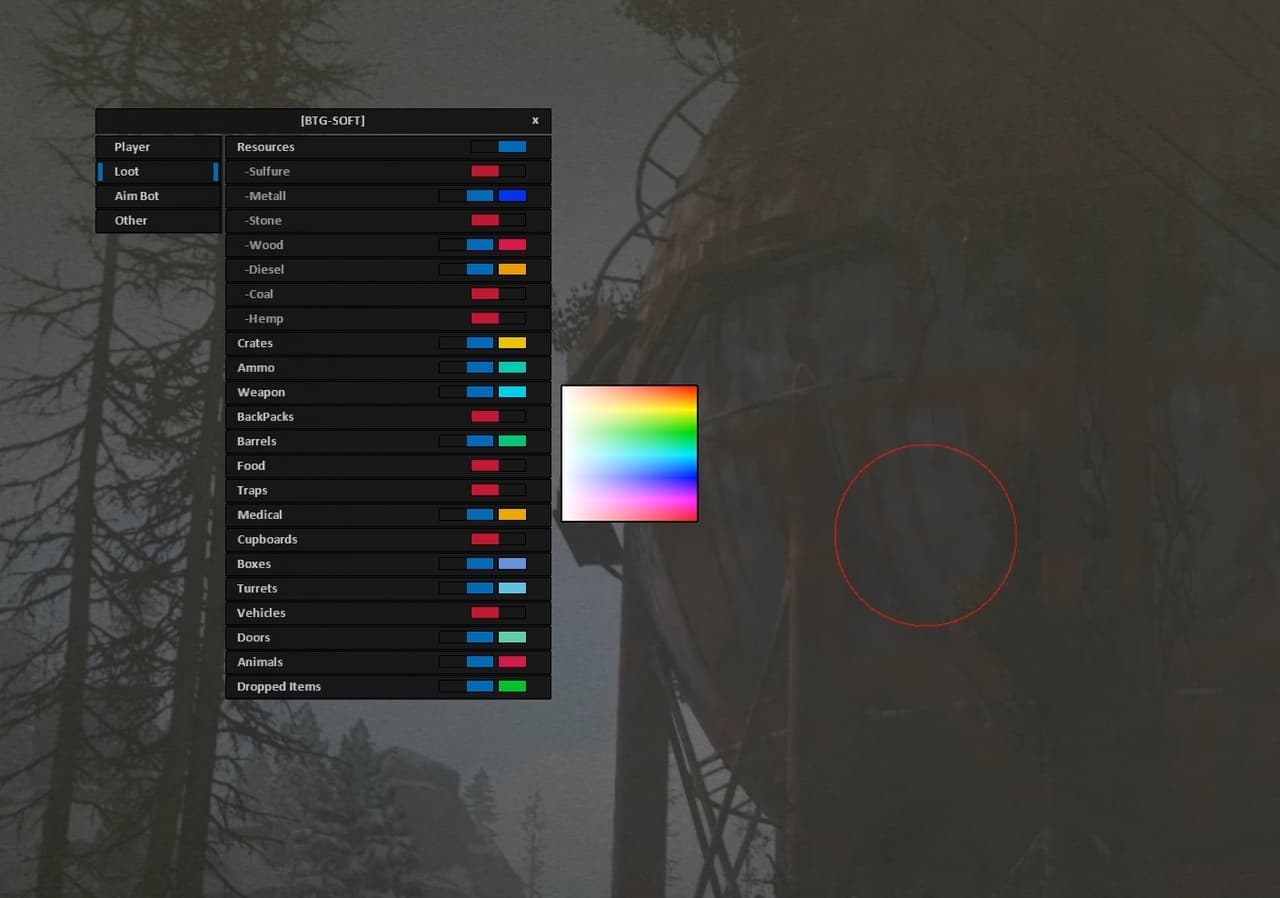
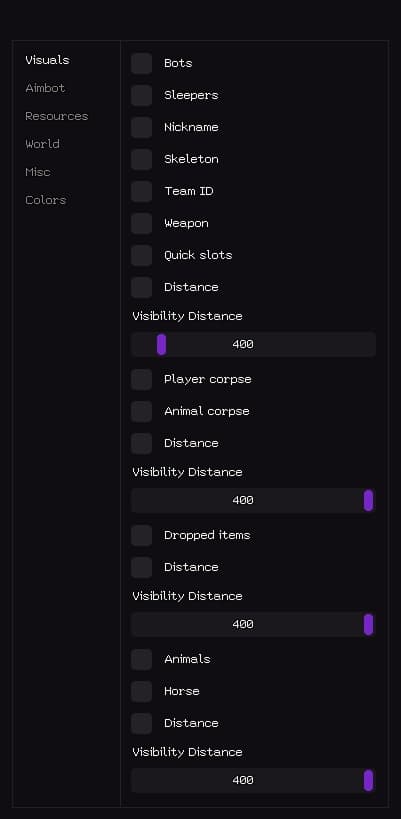
Private STEALTH RUST software for Rust. Stable operation, low detection rate, instant key delivery after payment. Stealth Full for Rust delivers everything: ESP, customizable aimbot, no recoil, and world settings. Features: Visuals: • Bots — Bots • Sleepers — Sleeping/inactive players • Nickname — Player nickname • Skeleton — Player skeleton • Team ID — Team ID • Weapon — Weapon held • Quick slots — Quick access slots • Distance — Distance • Visibility Distance (1–400) — Render distance Player corpse — Player corpse: • Animal corpse — Animal corpse • Distance — Distance • Visibility Distance (1–400) — Render distance Dropped items — Dropped items: • Distance — Distance • Visibility Distance (1–400) — Render distance Animals — Animals: • Horse — Horse • Distance — Distance • Visibility Distance (1–400) — Render distance Aimbot: • Enable aimbot — Enable the aimbot • Ignore team — Ignore teammates • Aimbot Type (Silent, Mouse) — Aimbot mode: silent or mouse movement • Bone (Nearest, Head, Chest, Pelvis) — Target bone: nearest, head, chest, pelvis • Ignore sleepers — Ignore sleeping/inactive players • Visible check — Target must be visible • Target FOV (1–400) — Aimbot field of view • Mouse aimbot time (1–400) — Aimbot reaction time • Mouse end delay (1–100) — Delay after shooting • Distance limit (1–400) — Max activation distance • Draw FOV — Show FOV radius • Draw target — Show current target Resources: • Stone chunk — Stone node • Metal chunk — Metal node • Sulfur chunk — Sulfur node • Wood chunk — Wood node • Ores collectable — Collectible ores • Wood collectable — Collectible wood • Hemp — Cloth plant • Diesel — Diesel fuel • Distance — Distance • Visibility Distance (1–400) — Render distance Food — Food: • Distance — Distance • Visibility Distance (1–400) — Render distance Crates — Crates: • Boxes — Boxes • Barrels — Barrels • Distance — Distance • Visibility Distance (1–400) — Render distance Airdrop — Airdrop: • Chinook crate — Chinook supply crate • Distance — Distance World: • Ground transport — Ground vehicles • Water transport — Watercraft • Air transport — Aircraft • Trains — Trains • Distance — Distance • Visibility Distance (1–1000) — Render distance Cupboard — Tool cupboard: • Storage — Storage containers • Workbench — Workbench • Distance — Distance • Visibility Distance (1–400) — Render distance NFC helicopters — NFC helicopters: • Bradley — Bradley APC • Cargo ship — Cargo ship • Distance — Distance • Visibility Distance (1–1000) — Render distance Deployable traps — Deployable traps: • Ground traps — Ground traps • Distance — Distance • Visibility Distance (1–400) — Render distance Misc: • World time / Hour (1–24) — Set in-game time • Bright world — Increased lighting • Debug camera — Debug camera (safe up to 100m) • Debug speed — Speed for debug camera • Debug bind — Hotkey for debug camera • Remove near construction — Remove nearby structures • Minimize recoil — Reduce weapon recoil • Minimize spread — Reduce bullet spread • No sway — Disable weapon sway • Automatic — Force automatic fire • Easy EOKA — EOKA fires reliably Colors: • Player sleeper — Color for sleeping players • Player friend — Color for friendly players • Player text — Color for player text • NPC text — Color for NPC text • Corpse — Color for corpses • Resources — Color for resources • World — Color for world objects • Animals — Color for animals • Aimbot visuals — Color for aimbot indicators

deliveryinstant

More products for this game

UNNAMEDin stock

UNNAMED

$6.00

Unnamed is a private cheat for Rust, built for stability, low detection risk and full customization. It includes two powerful aiming systems — Silent Aim and Vector Aimbot — each offering bone selection, FOV control, smoothness, movement prediction, distance limits and filters for sleepers and bots. The ESP system covers players, bots and world objects. Player ESP includes chams, boxes, skeletons, nicknames, distance, held item display, inventory ESP and team/sleeper filtering. Bot ESP provides identical options for full awareness in PvE-heavy areas. The World ESP module highlights all important Rust objects: workbenches, cupboards, large/small boxes, sleeping bags, trees, metal, sulfur, stone nodes, hemp, food, barrels, crates, dropped items, corpses and animals. The Misc tab offers recoil removal, sway/stability adjustments, spread control, a toggle for World ESP via hotkey, ESP font scaling and full configuration management (create, save, load, delete). AIMBOT Silent Aim Enable Silent Aim Bone: Head / Neck / Body Aim Key FOV Max Distance Ignore Sleepers Ignore Bots Draw Line to Target Show FOV Circle Show Aim Target Line Vector Aimbot Enable Aimbot Bone: Head / Neck / Body FOV Smoothness Target Prediction Aim Key Max Distance Ignore Sleepers Ignore Bots Draw Line to Target Show FOV Circle Show Aimbot Target Line Players / Bots ESP Enable ESP Chams (Players / Bots) Boxes Skeletons Show Held Item Show HotBar (Inventory) Nickname Distance Hide Teammates Show Sleepers Max Distance Separate settings for bots World ESP Workbench (with level) Tool Cupboard Large Box Small Box Sleeping Bag Wood / Metal / Sulfur / Stone Hemp Food Barrels Crates Dropped Items Corpses Animals Misc No Recoil (0–100%) No Weapon Sway No Spread Combat Mode Hotkey (turn on/off World ESP) ESP Font Size Enable Crosshair Create / Save / Load / Delete Config

ANCIENT RUSTin stock

ANCIENT RUST

$5.00

Private ANCIENT RUST software for Rust. Stable operation, low detection rate, instant key delivery after payment. ANCIENT for RUST offers advanced aimbot and ESP, allowing you to easily detect enemies and critical objects, giving you a survival edge. Features: Aimbot: • Enable — enable aimbot • Aim Key — set custom aim key • Aim Type (Memory / Silent) — select aimbot mode (memory-based or silent) • Smooth — aim smoothing • Delay — delay before aiming • Hit Chance — chance to hit • Draw Fov — show FOV circle • Fov Radius — set FOV radius • Draw Crosshair — show custom crosshair • Prediction Dot — show prediction dot • Target Line — draw line to target • Target Lock Key — set target lock hotkey • Lock Target — lock on current target • Max Aim Distance — maximum aim distance • Target Vischeck (Performance) — enable visibility check (may impact performance) • Force Head On Npc — force head aim on NPCs • Target Settings (Enemies/Npcs/Teammates/Sleepers/Friends) — target filters • Randomize Bone — enable randomized bone aiming • Target Bones (Head/Chest/Arms/Spine/Body) — bone selection for targeting Weapon: • Recoil — remove recoil • Recoil X — recoil compensation X-axis • Recoil Y — recoil compensation Y-axis • Spread — remove bullet spread • Spread Value — customize spread value • No Shotgun Spread — disable shotgun pellet spread • Instant Eoka — instant fire for Eoka • Instant Bow — instant fire for bow • Instant Compound — instant fire for compound bow • Force Automatic — convert weapons to full auto • Increase Bullet Speed — increase projectile speed • No Bob — disable weapon bobbing • No Lower — prevent weapon lowering • No Animations — remove weapon animations • No Sway — disable sway • Extended Melee — increase melee hit range Rage: • Auto Shoot — auto fire when target is valid • Rapid Shoot — increase fire rate • Thick Bullet — extend hitbox width • Bullet Thickness — bullet thickness setting • Hit Override (Only Head/No Head) — force hit only head / exclude head • Heli Rotor Override — override rotor hit detection • Hit Material Glass — bullets penetrate glass Players (Enemy/Team/Npc/Sleeper): • Enable — enable player ESP • Box — draw box around player • Box Type — set box style • Weapon — show equipped weapon • TeamID — display team ID • Distance — show distance to player • Skeleton — draw player skeleton • Look Direction — show view direction • Friendship — mark as friend • Look Alert — alert when player looks at you • Flags — status flags • Hotbar (Above players) — show hotbar above players • Explosion Flags — explosion-related markers • Visible Check (Performance) — visibility check (may reduce performance) • Offscreen Arrows — enable offscreen indicators • Arrows Radius — set offscreen arrow radius • Draw Hotbar — show player hotbar • Hotbar Scale — scale hotbar size • Draw Dead Players — display dead bodies • Player Chams — enable player chams • Chams Type — select chams type Radar: • Enable — enable radar • Radar Scale — adjust radar scale • Max Show Distance — max range for showing entities • Draw Enemies — show enemies on radar • Teammates — show teammates on radar • Npcs — show NPCs on radar • Sleepers — show sleepers on radar World: • Ores — show ore nodes • Crates — show crates • Animals — show animals • Collectables — show collectable items • Vehicles — show vehicles • Traps — show traps • Build — show base structures • Others — show other world objects • You can fully customize every selected object — full customization per object • Draw Name — display object name • Draw Distance — display object distance • Limit Distance — enable draw limit • Max Distance — set max ESP range Draw Closest X Bonus — highlight closest X objects: • Farm Assist — enable ore farming assist • Path Finding — draw optimal route to nearest ores (Stone/Metal/Sulfur) Raids: • Enable — enable raid detection • Raid Time — time since explosion • Max Raid Time — max time to consider as raid • Max Raid Distance — max distance for raid ESP • Draw C4 — show C4 • Draw Satchel — show satchels • Draw Rocket — show rockets • Draw Explosive Ammo — show explosive rounds • Draw Mlrs — show MLRS strikes Misc (General): • Weapon Chams — enable chams on weapons • Hand Chams — enable chams on hands • Instant Loot — loot instantly • Instant Revive & PickUp — revive and pick up instantly • Debug Camera — enable debug camera • Debug Speed Multiplyer — debug cam speed multiplier • Battle Mode — enable battle mode • Friend Ship Enable — enable friendship system • Mark As Friend — mark target as friend • Mark As Enemy — mark target as enemy • FishingBot — enable fishing bot • Auto Fishing Bot — automatic fishing • Auto Swap Fishing Rod — auto-switch fishing rod Misc (World): • Player Fov — player FOV control • Fov Value — FOV value • Player Zoom — player zoom control • Zoom Value — zoom value • No Screen Shake — disable screen shake • No Shadows — remove shadows • Aspect Ratio — override aspect ratio • Aspect Value — set aspect ratio value • Bright Night/Caves — brighten night and caves • Bright Intensivity — control brightness level • Sky Color — change sky color • Rayleigh — atmosphere density • Rayleigh Value — Rayleigh setting • Mie — fog intensity • Mie Value — Mie setting • Remove Layers — remove terrain layers Movement: • No Fall Damage — disable fall damage • Spider — walk on walls • Infinity Jump — unlimited jumps • Shoot In Air — shoot while airborne • No Player Collision — disable player collisions • Omni Sprint — sprint in all directions • No Clip — enable noclip • No Clip Reset — reset noclip • No Clip Speed Multiplyer — set noclip speed multiplier • On Ladder — interact while on ladder • Anti SpeedHack Violations — prevent speedhack flags • SpeedHack — increase movement speed Other: • Limit Render FPS — cap ESP rendering FPS • Skeleton Thickness — set skeleton line thickness Cloud Configs: • Create — create new config • Save — save current config • Import — import config • Export — export config

MORPHINE RUSTin stock

MORPHINE RUST

$5.00

Private MORPHINE RUST software for Rust. Stable operation, low detection rate, instant key delivery after payment. Morphine for Rust with Aimbot, ESP, Radar and Loot features. Features: Aim: • Enable • Visible Check • Silent • Target NPC • Smooth • Hitchance • FOV • Draw FOV • Line to Target • Aim Bone • Hitbox Override • Override Bone Weapon: • Recoil Compensation • No Recoil • No Spread • Shotgun No Spread • Fast Bullet • Rapid Fire • Fat Bullet • Always Shoot • Instant Eoka • Instant Bow • Instant Compound Player ESP: • Enable • Visible Check • Distance • Sleepers • Wounded • Draw Indicators • Draw on Map • Draw on Radar • Player Chams • Boxes • Skeleton • Health Bar • Nickname • Distance Tag • Team ID • Flags • Held Item • Item Icon World ESP: • Sleeping Bag • Cupboards • Workbenches • Gun Trap • Turret • Sam Site • Flame Turret • Land Mine • Corpses • Backpacks • Dropped Items Vehicles: • Mini Copter • Scrap Heli • Bicycle • Motor Bike • Horse • Boat Resources: • Sulfur • Metal • Stone • Hemp • Crates Events: • Raid ESP • Animals • Bradley • Chinook • Patrol Heli HUD: • Copy Steam Link • Clothes • Hotbar • Hitmarkers • Rocket Helper • Local Bullet Tracer • World Bullet Tracer • Radar Bullets • Reload Bar • Raycasting • Hand Chams • Gun Chams • Bind Island • Watermark • FPS Counter • Server Info • Radar Movement: • Infinity Jump • Spider • Always Sprint Loot: • Fast Loot • Instant Revive • Loot Tied Crates • Silent Melee • Silent Farm • Drop All Items Weapon Visual: • No Weapon Bob • No Weapon Lower • No Weapon Animation Misc: • Battle Mode • Change Hand Position • Remove Layers • Debug Camera • Third Person • Zoom • FOV Changer • Aspect Ratio World Visual: • Bright Ambient • Fog Color • Sky Color • Change Clouds • Change Stars • Change Time • Change Atmosphere • Change Weather

COVCHEG RUSTin stock

COVCHEG RUST

$4.35

Private COVCHEG RUST software for Rust. Stable operation, low detection rate, instant key delivery after payment. Elevate your gameplay in RUST with the budget-friendly COVCHEG private cheat by developer COVCHEG. Unlock features like ESP, aimbot. Features: AIM (AIMBOT): • Active – enable the aimbot • FOV – size of the aimbot's targeting area • Draw FOV – display the aimbot FOV circle on screen • Smooth – aiming smoothness (higher value = weaker aim assist) • Aim Distance – effective range of the aimbot • Bone Body / Force Head – by default, the aimbot targets the body; enable Force Head to target the head • Remove Sway & Recoil – disables weapon sway and recoil when shooting • Aim Key – key to activate the aimbot (hold to use) Player ESP (Wallhack): • Enable – enable/disable wallhack to display players in Rust Covcheg • BOX – wallhack with player boxes • Names – show player nicknames • Skeleton – skeleton-based wallhack • Distance – display distance to targets (in meters) • Max Distance – limit the range of the player ESP • Ignore Sleepers – don't show sleeping players Loot / World ESP: • Item ESP – enable ESP for item display • Only Collectable – show only lootable items • Ores (Metal, Sulfur, Stone) – display ore nodes (metal, sulfur, stone) • Wood – show wood piles • Stash – show hidden stashes • Crates (Medical, Food, Tool, Elite) – display crates (medical, food, tool, elite) • Minicopter – display minicopters • Backpack – display backpacks • Max Distance – ESP range for loot display